
Decoding Your Digital Footprint: Understanding Google Business Profile Insights for Your Law Firm
Turn Clicks, Calls, and Views into Actionable Intelligence to Attract More Clients
You’ve optimized your Google Business Profile (GBP) – great! But how do you know if it’s actually working? Google provides a built-in analytics dashboard called Insights, offering valuable data about how potential clients find and interact with your listing. Understanding this data is crucial for measuring performance, identifying what resonates, and making informed decisions to further enhance your local visibility and attract more clients in your city. This guide breaks down the key metrics within GBP Insights and explains how attorneys can use them strategically. For the complete optimization process, see our Ultimate GBP Optimization Guide for Attorneys.
Why Attorneys Can’t Afford to Ignore GBP Insights
“Gut feeling” isn’t a reliable marketing strategy. GBP Insights provides concrete data that helps your law firm:
- Measure Performance: Understand how many people are finding and interacting with your profile.
- Understand Client Behavior: See how potential clients search for services like yours and what actions they take.
- Identify Optimization Opportunities: Pinpoint areas of your profile that are performing well or need improvement.
- Track Growth Over Time: Monitor trends in visibility and engagement month-over-month or year-over-year.
- Make Data-Driven Decisions: Base your optimization efforts, content strategy, and even service focus on real user data, not guesswork.
Ignoring this data means flying blind and potentially missing significant opportunities to connect with qualified local clients.
Accessing Your Insights Dashboard
You can typically access GBP Insights in a few ways:
- Directly on Google Search: Search for your exact business name while logged into the managing Google account. Look for the business profile panel and click on “Performance” or “Insights.”
- Via Google Maps: Search for your business in the Maps app while logged in, tap your profile, and look for performance/insights options.
- (Historically) GBP Dashboard: The interfaces are evolving, but insights were traditionally found in the main GBP management dashboard.
Google often updates the interface, but look for terms like “Performance,” “Insights,” or analytics icons.
Key Metrics Explained: What They Mean for Your Firm
Let’s break down the core data points you’ll find:
How Customers Search for Your Business: This chart typically shows:
- Direct Searches: Users who searched specifically for your firm’s name or address. (Indicates brand awareness).
- Discovery Searches: Users who searched for a category, product, or service you offer, and your listing appeared. (Crucial for attracting new clients who don’t know your name yet!).
- Branded Searches: Users who searched for your brand or a brand related to your business. (Often overlaps with Direct).
- Attorney Takeaway: A high percentage of Discovery searches is generally positive, showing your optimization efforts are attracting clients searching for your services, not just your name.
Search Queries: (Note: Google often shows only a sample of top queries and anonymizes data for privacy).
- What it is: The actual terms users typed into Google that triggered your profile to appear.
- Value: Provides direct insight into the language potential clients use. Helps confirm if you’re showing up for relevant practice area + location terms. Can uncover unexpected keyword opportunities.
Attorney Takeaway: Regularly review these queries. Are they aligned with your key practice areas (e.g., “divorce lawyer in your city,” “car accident attorney near me”)? Use relevant queries found here to refine your GBP description, services, and posts. See our Keyword Guide.
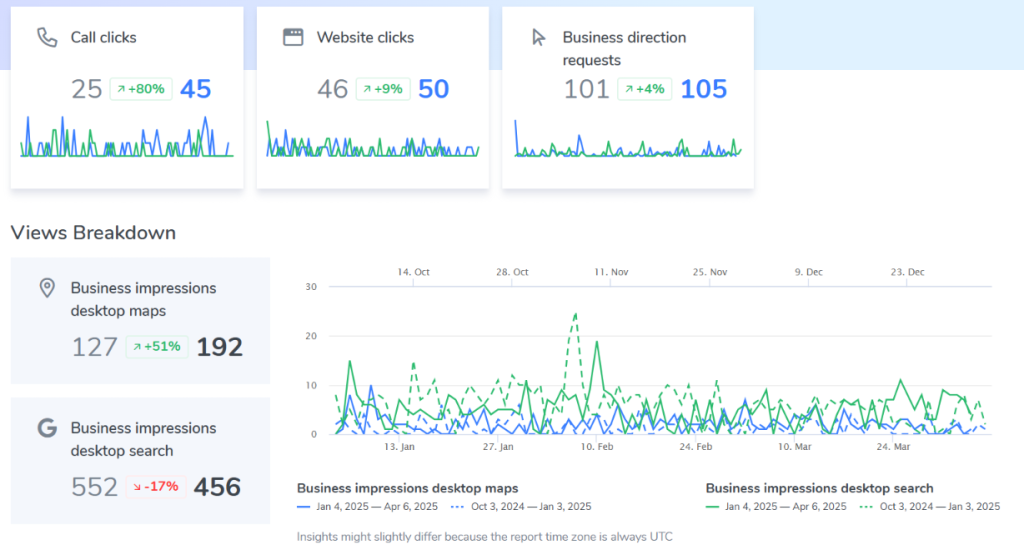
Customer Actions: Tracks high-intent actions users took directly from your GBP listing.
- Phone Calls: Clicks on the “Call” button (especially valuable on mobile).
- Website Clicks: Clicks on your website link.
- Direction Requests: Clicks seeking directions to your office.
Attorney Takeaway: These are strong indicators of lead generation potential. Track trends here – are calls increasing after specific optimizations? Are website clicks leading to contact form submissions (requires website analytics)? See our ROI Guide.
Customer Actions & Potential Value
|
GBP Action |
What it Means |
Potential Value for Law Firm |
How to Improve It |
|
Phone Calls |
User clicked to call your listed number. |
High-intent lead, immediate contact potential. |
Ensure number is accurate, optimize for local terms. |
|
Website Clicks |
User visited your website from your GBP listing. |
Opportunity for deeper engagement, lead capture via site forms. |
Ensure website link is correct, have compelling website. |
Photo & Video Performance:
- Views: How often your photos/videos were viewed compared to competitors.
- Quantity: How many photos/videos you have compared to competitors.
Attorney Takeaway: High views suggest your visuals are engaging. Low views or quantity compared to competitors might indicate a need to upload more high-quality, relevant images and videos. Good visuals build trust. See our Photos/Video Guide.
(If Applicable) Post Performance:
- Views: How many times your Google Posts were seen.
- Clicks: How many times users clicked on the CTA button in your Posts.
Attorney Takeaway: Helps understand which Post topics and CTAs resonate most with your audience. Use this to refine your content strategy. See our Post Strategy Guide.
Turning Data into Action: Using Insights to Refine Your Strategy
Data is useless without action. Use your GBP Insights to:
- Optimize Content: If relevant search queries don’t match your services, refine your Description, Services list, and Posts with better keywords.
- Improve Engagement: Low calls or website clicks? Enhance your description, add clearer CTAs in Posts, improve photos, or focus on getting more positive reviews.
- Enhance Visuals: Low photo views? Invest in better quality, more relevant photos and videos.
- Adjust Posting Strategy: If certain Post types get significantly more views/clicks, create more content like that.
- Confirm Category Relevance: If Discovery searches are low, re-evaluate if your Primary and Secondary Categories are truly optimal.
You typically choose one destination number within the GBP setup.
Important Caveats: Understanding the Limitations of GBP Insights
While valuable, GBP Insights has limitations:
- Data Delays: Information isn’t always real-time; there can be a lag of a few days.
- Sampling & Privacy: Especially for Search Queries, Google often provides only a sample of top terms and anonymizes data, so you don’t see every search.
- Limited Granularity: You can’t see who specifically clicked or called, just the aggregate numbers. Demographic data is very limited within GBP Insights itself.
- Attribution Challenges: It can be hard to definitively link a specific optimization action to a specific change in Insights without careful tracking over time and potentially using supplementary tools (like call tracking with unique numbers or advanced website analytics with UTM parameters).
Frequently Asked Questions About GBP Insights
Beyond Basic Analytics: The Value of Expert Interpretation
Interpreting GBP Insights effectively involves more than just looking at the numbers. It requires understanding the context, correlating the data with other factors (like ranking changes, seasonality, website traffic), and knowing how to translate those observations into effective strategic actions. Thunderhead Marketing’s experts go beyond basic reporting, providing deeper analysis and actionable recommendations based on your unique data and goals.
Conclusion: Make Data-Driven Decisions for Growth
Your Google Business Profile Insights dashboard is a free, powerful tool providing direct feedback on your local online presence. By regularly reviewing key metrics like search queries, user actions, and photo views, and using that data to inform your optimization strategy, your law firm can move beyond guesswork and make smarter, data-driven decisions that lead to increased visibility, more qualified leads, and sustainable growth in your City.
Ready to Turn Your GBP Data into Actionable Strategy?
Book Your Free Audit
Let’s review your current GBP Insights together. We’ll help you understand what the data really means for your firm and identify key areas for improvement in a Free, No-Obligation Audit.
Explore Our Managed GBP Optimization Service
Let Thunderhead Marketing handle the ongoing optimization, updates, posts, reviews, and more, backed by our 90-day visibility guarantee. Focus on practicing law while we handle your local online presence.
Explore the Full Optimization Process
See how understanding Insights fits into the complete GBP strategy. Access the step-by-step guide, downloadable checklist, and interactive tracking sheet.
Stop guessing, start growing. Take action today!
About Thunderhead Marketing
Thunderhead Marketing is a dedicated digital marketing agency specializing in helping attorneys and law firms achieve measurable growth online. Our team possesses deep expertise in local SEO, Google Business Profile optimization, and comprehensive digital strategies tailored to the unique needs of the legal profession. We are committed to transparency, results, and becoming a trusted partner in your firm’s success. Learn more about us at https://www.thunderheadmarketing.com/about-us/.
Meet Our GBP Team

Celeste gonzalez schooley
GBP Manager

Jeremy schooley
GBP Manager

Kim spangler
Content Manager